 gibeon.io
Screens for your gym
Class schedule, how busy each zone is, membership promos and a separate menu screen for the protein bar. Fed automatically, always current. One workspace for all your clubs.
Updated
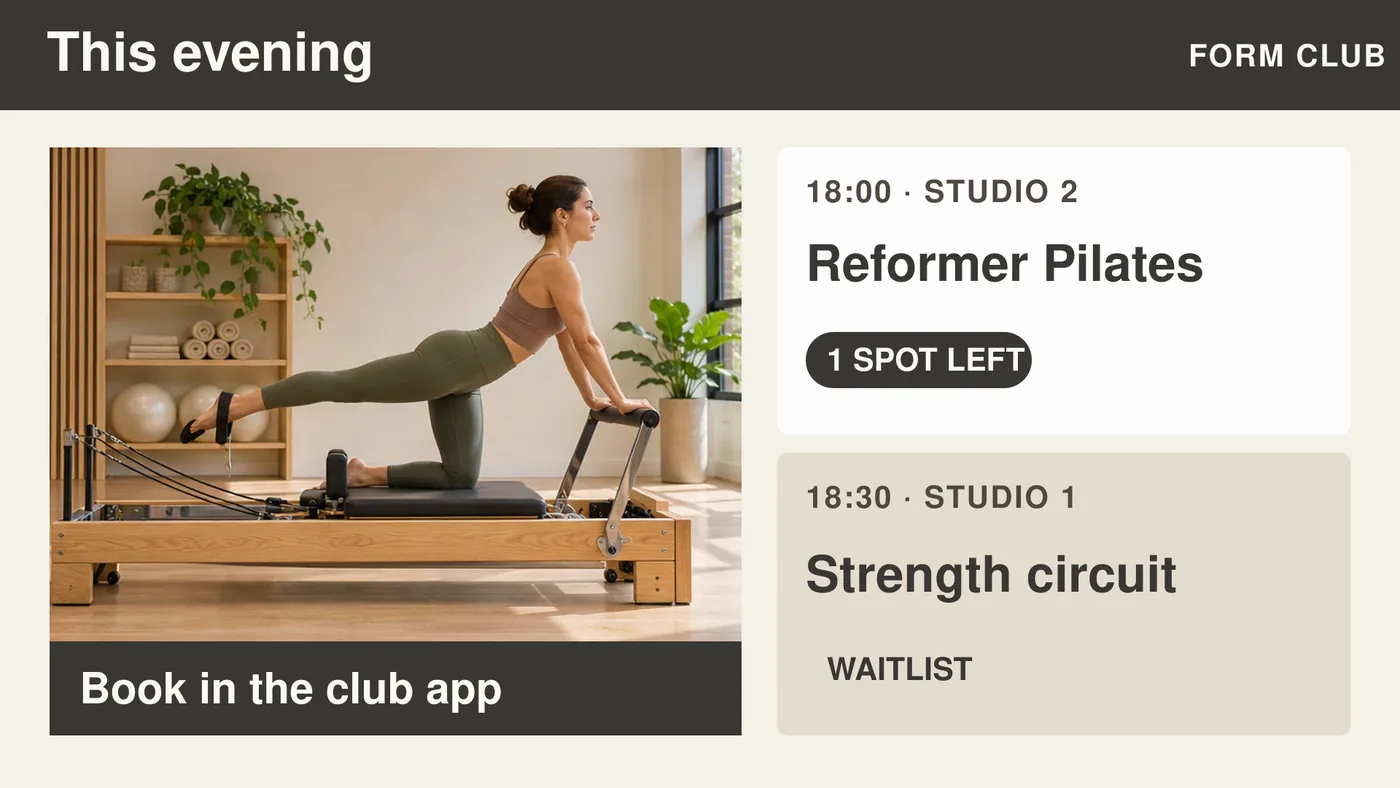
Always the right schedule
Class schedule and room changes show up automatically, fed from your planning system.
More renewals and upsells
Promos for personal training, nutrition and memberships at the right moment, in the right place.
One workspace for all your clubs
Roll out central campaigns, manage the local schedule per location.
A screen in your club does more than keep members busy
A well-placed screen at the entrance shows today's class schedule, the next free spots in the spin class and the promo for the summer membership. Those are three things you'd otherwise need three separate channels for: a chalkboard, a Facebook post and a staff member to answer the question. Gibeon brings them together on one screen.
The content feeds itself from your planning system via a CSV or JSON link (a Google Sheet works too). No staff member has to update the screen by hand. When a room changes or a class is cancelled, the screen adjusts automatically, without anyone having to look at it.
Six places in your club where a screen earns its keep
Class-schedule screen at the entrance
Shows today's and tomorrow's schedule, with instructor and spots left. Members see right away whether a class is full.
Busyness and occupancy per zone
Weight room, treadmills, group classes: an occupancy indicator on the screen cuts needless waiting and spreads the flow across the club.
Promos for memberships and PT
Promo screen in the changing room or at reception: summer campaign, referral discount, personal-training package. Rotated on schedule, no poster needed.
Welcome and member notices
Opening hours, maintenance work, holiday timetable, club news. Fewer questions at the desk, more self-service for members.
Group-class room: next class and instructor
On the screen in the room: which class starts next, who teaches it and how many spots are left. Updated automatically from your planning.
Smoothie and protein bar: menu screen
Products, prices, allergens: fed from a CSV or Google Sheet. Change a price in your spreadsheet, the screen follows within fifteen minutes.
Connections with your planning system · Via a CSV or JSON link, whichever fits your club
CSV or JSON link (also Google Sheets)
Paste a public link to your class schedule as a CSV file, a JSON list or a Google Sheet. No login or API key needed. gibeon.io fetches the link every 15 minutes and shows the result on the screen with no manual work.
JSON list (your own system)
Can your planning system put a JSON list on a public link? Paste that link, pick up to four columns and gibeon.io shows them as a table on the screen.
Virtuagym, Mindbody or another class-scheduling platform
Such platforms keep their data behind a login or an API key, which the link refuses. Export the schedule to a Google Sheet or a CSV and put it behind a public link.
Working with a different sports platform? Export to a Google Sheet or a CSV and put it behind a public link.
Frequently asked questions
Can the class schedule appear on the screen automatically?
Yes. You provide a CSV or JSON link from your planning system, and Gibeon shows the schedule automatically on the entrance screen or in the room. Change a class, and the screen adjusts within fifteen minutes.
Does Gibeon work for multiple clubs or a franchise?
Yes. You manage every location from one workspace. You roll out central campaigns and branding across all clubs at once, while each location keeps its own schedule and local notices.
Which screens work in a sweaty gym environment?
Any commercial Smart TV or Android display with at least 400 nits of brightness is enough for an indoor space. For high-humidity zones (next to the showers or the pool), pick a display with an IP protection rating or a protective enclosure. Gibeon runs as an app on the screen, no extra hardware needed.
Can I run the screen 24/7?
Yes. Gibeon is built for continuous use. You can have the screen dim or switch off automatically outside opening hours via the scheduling feature, so the display lasts longer.
How much does this cost per screen?
Nothing per screen. You pay per workspace, not per screen. See the current prices at /plans.
Does it work without internet?
Gibeon stores the latest version of your content locally on the screen. During a brief internet outage the screen keeps running on the cached content. As soon as the connection is back, changes sync automatically.
Other sectors · more verticals
Ready to put your class schedule on the screen?
Start free and see your first screen live within fifteen minutes. Prefer a tour first? Book a twenty-minute demo.